
QR Codes for Manufacturing
Modern factories rely on fast access to information, accurate tracking, and efficient communication between teams. Implementing QR code manufacturing systems allows companies to connect physical assets, equipment, and products to digital data instantly.
Trusted by 1020+ manufacturers in 65 countires






Many industrial companies now integrate QR codes in manufacturing workflows to track assets, manage inventory, deliver digital manuals, and simplify maintenance procedures. With tools like the Pageloot QR tags generator, manufacturers can create scalable QR labeling systems that connect equipment and products with digital platforms.
By placing QR codes on machines, components, documentation, and inventory locations, manufacturers can streamline operations, reduce manual errors, and improve transparency across the production cycle.
Where to Use QR Codes in Manufacturing
Streamline your operations. Add QR codes in these key spots:

Equipment labels
QR codes placed on machinery provide quick access to maintenance logs, service history, or troubleshooting documentation. Technicians can scan the code to view repair instructions or record maintenance activity in seconds.

Warehouse and inventory locations
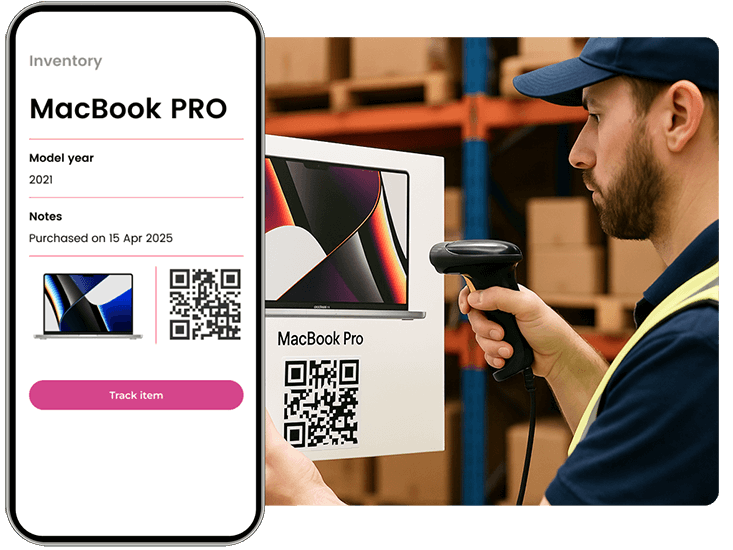
Many factories apply QR codes in manufacturing environments to identify storage locations, track materials, and manage warehouse workflows. Scanning codes reduces inventory mistakes and improves traceability.
Product documentation and manuals
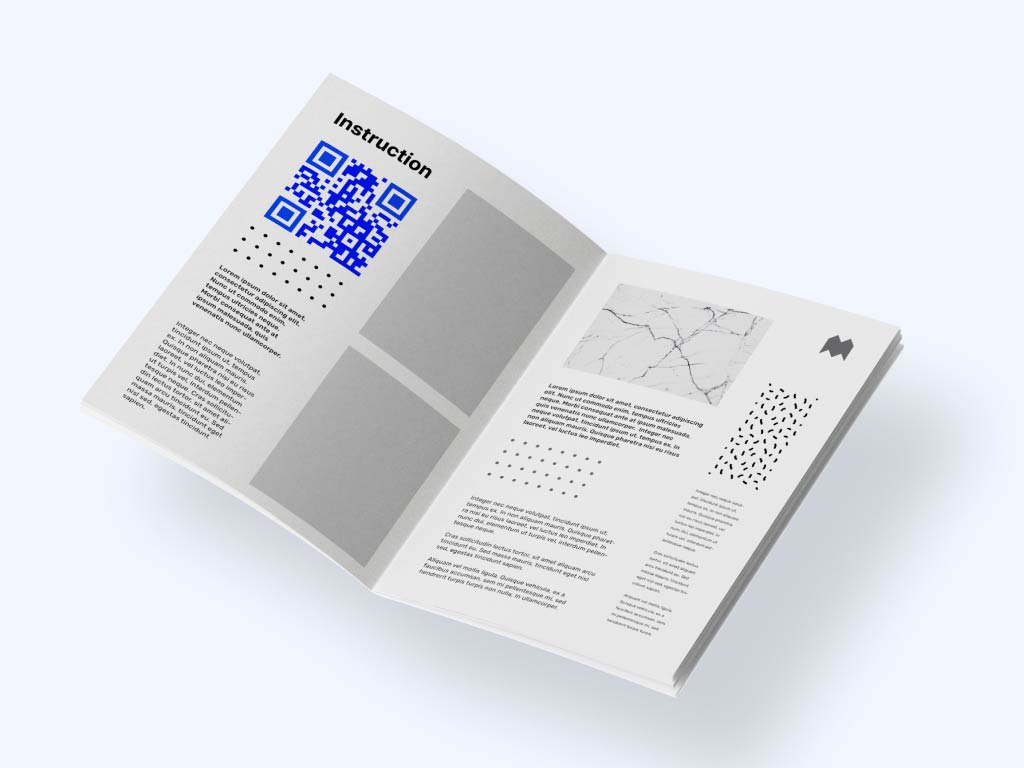
Instead of printing large instruction booklets, manufacturers can link QR codes to digital manuals, training videos, or assembly guides. This simplifies documentation updates without reprinting materials.

Product tags and packaging
Manufacturers often attach QR codes to finished products to support authenticity verification, warranty registration, or product information pages. This improves transparency and strengthens customer trust.
Take a look
at a real case

Why QR Codes Are Important for Manufacturing
The use of QR codes in manufacturing is rapidly expanding as factories move toward digital transformation and smart production environments.
QR codes provide several advantages for industrial operations:
Improved asset tracking – instantly identify machines, tools, and materials.
Reduced paperwork – replace printed documentation with digital resources.
Faster maintenance processes – technicians access repair guides immediately.
Enhanced product traceability – track items across the supply chain.
Better compliance and safety – share safety procedures or regulations through a quick scan.
Unlike traditional barcodes, QR codes can store more information and link directly to cloud-based systems, making them ideal for modern manufacturing environments.
Malenka Stenner
Managing director, Weingut Stenner
Best QR Code Types for Manufacturing
Different operational goals require different types of QR codes. Choosing the right format helps maximize efficiency and automation. Companies looking for scalable implementations often explore the complete solutions on QR codes offered by Pageloot to integrate QR technology into their production workflows.
- URL QR Codes
These codes link to online dashboards, maintenance instructions, or product data pages. They are widely used in QR code manufacturing systems.
- vCard QR Codes
These QR codes store contact details for maintenance teams or support engineers, making it easier to request assistance.
- PDF QR Codes
PDF codes allow teams to access technical manuals, equipment guides, or inspection documents instantly.
- Text QR Codes
Text-based QR codes can contain part numbers, asset IDs, or inventory references and are frequently used as part of industrial labeling systems.

For manufacturing businesses
"Pageloot streamlined our inventory tracking. The QR code for inventory management has saved us hours of manual work every week."
Jorge Vasquez
Operations lead, Steelcore
How Businesses Use QR Codes in Manufacturing
Manufacturing companies use QR technology in multiple ways to optimize production and logistics.
 Inventory management
 Equipment maintenance
  Production tracking
 Worker training and safetyInventory management
Benefits
Inventory management
QR labels attached to parts and storage areas help teams quickly identify materials and update stock records.
Equipment maintenance Benefits
Equipment maintenance
Maintenance teams scan machine labels to view service history, update repair records, or access technical documentation.
 Production tracking
Benefits
Production tracking
QR codes enable real-time tracking of components and finished goods throughout the manufacturing process.
 Worker training and safety
Benefits
Worker training and safety
Factories place QR codes near equipment to provide quick access to safety instructions, operational videos, and compliance guidelines.
Through the effective use of QR codes in manufacturing, organizations reduce downtime, minimize operational errors, and improve communication across departments.

Hear From Businesses in Manufacturing
See how they are using Pageloot to turn QR codes into real growth.
Manufacturers across different industries have adopted QR codes in manufacturing to improve operational efficiency and data accessibility.
Industrial companies report that QR-based labeling systems help reduce maintenance delays, simplify training processes, and improve product traceability across supply chains.
Using digital QR tools also allows managers to monitor scanning activity and better understand how equipment and materials move through the production environment.
Many factories start with simple asset labels and gradually expand to full digital workflows powered by the Pageloot platform.









How to Create a QR Code in Manufacturing
Implementing QR codes in a manufacturing environment is straightforward and does not require specialized technical skills.
Step 1: Choose the data you want to link
Decide whether the QR code should open a maintenance manual, product database, safety guide, or asset management system.
Step 2: Generate the QR code
Use a reliable tool like the Pageloot QR code generator freeware to create QR codes for machines, products, or inventory locations.
Step 3: Label equipment or products
Print the QR codes on durable labels or industrial tags and place them on equipment, packaging, or warehouse storage areas.
Step 4: Monitor and optimize usage
As your QR code program grows, you may want advanced features such as analytics, dynamic links, and bulk generation. Understanding the available QR code generator price options helps businesses scale their QR infrastructure efficiently.
Frequently asked questions

The use of qr codes in manufacturing helps companies improve asset tracking, streamline inventory management, reduce documentation costs, and provide instant access to technical information.
Manufacturers can place QR codes on product tags that link to official verification pages, allowing customers and partners to confirm authenticity.
Yes. QR codes placed near machines can link directly to safety procedures, operational manuals, or training materials.
Technicians can scan equipment labels to access service records, update inspection logs, and review repair instructions.
Yes. By providing instant access to manuals, parts information, and maintenance documentation, QR codes help reduce downtime.
Replacing printed manuals and paperwork with digital resources lowers printing expenses and simplifies updates.
Start by generating equipment or inventory labels using a professional QR platform and gradually expand the system across your production workflow.
IP-03
Optimize your manufacturing with QR codes
Enhance efficiency with scannable QR codes for inventory tracking and product authentication.










